
Access the Table from a Portfolio Roadmap
A portfolio roadmap allows you to combine multiple roadmaps into a single, comprehensive view. It’s great for sharing with executives who like to know how concurrent initiatives contribute to an overarching product plan. It’s also great for identifying important points of intersection between teams, whether that’s dependencies, areas of redundancy, or resource capacity. On the other hand, the table layout is a place for you to dig into the details of an individual roadmap - spreadsheet style. You can see which initiatives have been parked vs planned, filter your data by lane, label, or tag, and search for specific keywords. Previously, you weren’t able to view and manage your portfolio-level data from the table. But we know that when you combine multiple roadmaps you bring together a lot of data. You should have a way to view, search, and filter that data in a central place. Starting today, we’re releasing an open beta version of our table layout in portfolio for all professional and enterprise customers. With the table now accessible from a portfolio roadmap, you’ll be able to:
- Compare the status, strategic importance, percent complete, effort required, and more of initiatives across your roadmaps
- Access a master backlog of ideas to help you hold high-level prioritization discussions
- Identify connections, dependencies, and points of conflict between multiple roadmaps
- Quickly search through a portfolio’s worth of data to find what you’re looking for
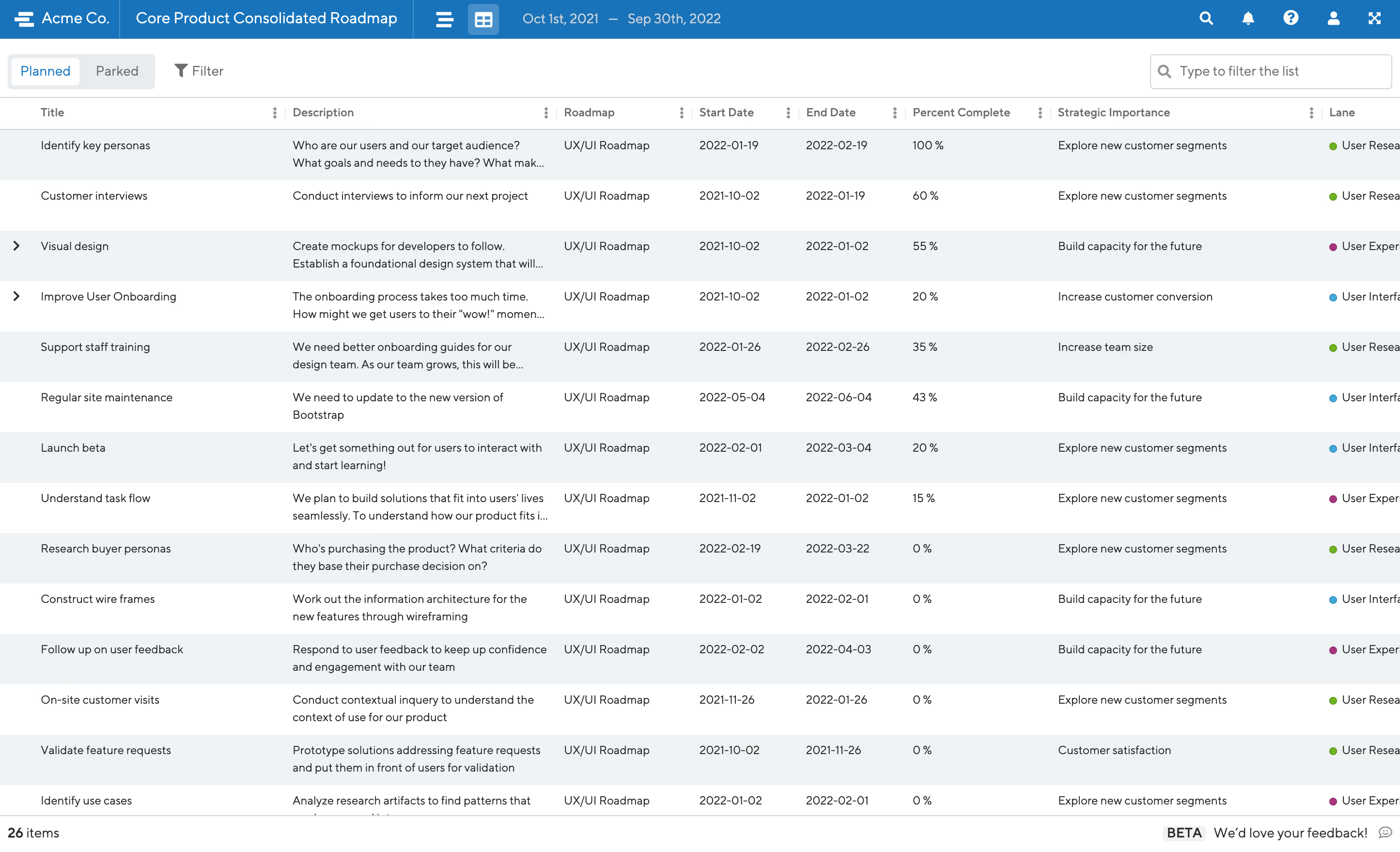
Table layout in a portfolio roadmap will function similarly to the table layout in an individual roadmap, with a few key differences. First of all, the table layout of a portfolio roadmap will be view-only, just like other portfolio-level layouts like timeline and list. You will also notice that a new “roadmap” column has been added to the table so you know at a glance which roadmap your data is coming from. Speaking of columns, all columns will be displayed by default in the portfolio table. This includes any custom fields you may have configured. Finally, we’ve improved both the design and performance of the portfolio table. When you access the table, you’ll find a roomier layout to make space for all the initiatives and data points living across your roadmaps. You’ll also notice lightning-quick load times. If the point of a portfolio table is to bring together a lot of data, we wanted to make sure you could maneuver through it with ease.
Ready to build with confidence?


.svg)